
Introduction
It is fascinating to realize that after twenty years in the industry I know so little about color. But hopefully I can still share a bit of knowledge with you.
When you work in lighting, you obviously know some tricks: like orange and blue go well together. This scheme (a combination of colors), called “orange and teal“, is probably the most used in Hollywood. Probably because it is the less risky of all.
They are actually a couple of posts that explain it pretty well.
Since we have an Art Department doing Color Keys for us, it is easy for a lighting artist to only scratch the surface when it comes to color: just match the reference !
A color key is a concept painting, generally done in Photoshop by the Art Department.


Pretty good match of the color key, right ? It is not always the case but we will see about this later.
First, let’s have a look at the frames: orange is coming from the fire and blue is coming from the roof. Nice Complementary Scheme ! This scheme is the most used in the Animation Industry nowadays. But there are actually plenty of others schemes available (we will study them below).
Color Terminology
Let’s step back a bit and start from the beginning. I really do not want to copy articles from Wikipedia. So I will just do a quick catch-up on terminology. All the information you need is on the internet ! For example, the Khan Academy of Pixar about Color Science is pretty interesting. To talk about color, we mainly use these three important terms:

- Hue: also called color, tone, shade or tint.
- Saturation: also called colorfulness.
- Value: also called lightness.
From Sharon Callahan: The eye is more attracted to a color than to a neutral image, the more saturated the color, the more attention it grabs.
Color Model and Wheel
How do we organize colors ? Color Wheel is an interesting tool to start working with colors. They are two main different models of mixing colors:
- RGB: the RGB color model is an additive color model in which red, green and blue light are added together in various ways to reproduce a broad array of colors, used in Computer Graphics.
- CMYK: the CMYK color model is a subtractive color model, used in color printing.

These are the two most used models in the industry.
There is no model better than the other one. They just have different uses. Each model has its own color wheel, based on primary, secondary and tertiary colors.
The RGB Color Model with its additive model is the one used in Computer Graphics. I have done a render in Guerilla Render using 3 spotlights with red, green and blue primaries. We have seen in the previous chapter that our cones are mostly sensitive to these three colors.

Guerilla Render is based on the RGB color model, like most render engines.
Kelvin Temperature Chart
The use of Color Wheels is also important when it comes to temperature. It is something you will hear quite a lot in lighting dailies: “this is too warm” or “make this light cooler“.

In most renderers you have access to several color picking options.
Color temperature is conventionally expressed in kelvins, using the symbol K, a unit of measure for absolute temperature. Color temperatures over 5000 K are called “cool colors” (bluish), while lower color temperatures (2700–3000 K) are called “warm colors” (yellowish).

This Kelvin chart goes from orange to blue… It kind of reminds us something, right ? The “orange and teal” scheme, which unconsciously reminds us of a natural lighting.
Planckian locus VS Daylight locus
Something worth mentioning is that, contrary to what many diagrams show on the internet (included the one above), 10000K will not give you the “blue sky” color. It is merely an attempt at classification ! If you have a look at the PxrBlackBody documentation from Renderman, you will see a table that could be misleading:
| Temperature Value | Source |
| 15000 to 27000 | Clear blue poleward sky |
There are actually two distinct “datasets” for each locus: “Planckian locus” and “Daylight locus“. This article describes them precisely. And since the sky is not an emissive/incandescent body, it is basically impossible for a lighting artist to achieve a blue sky color by using the Planckian lockus. It is just the wrong dataset.
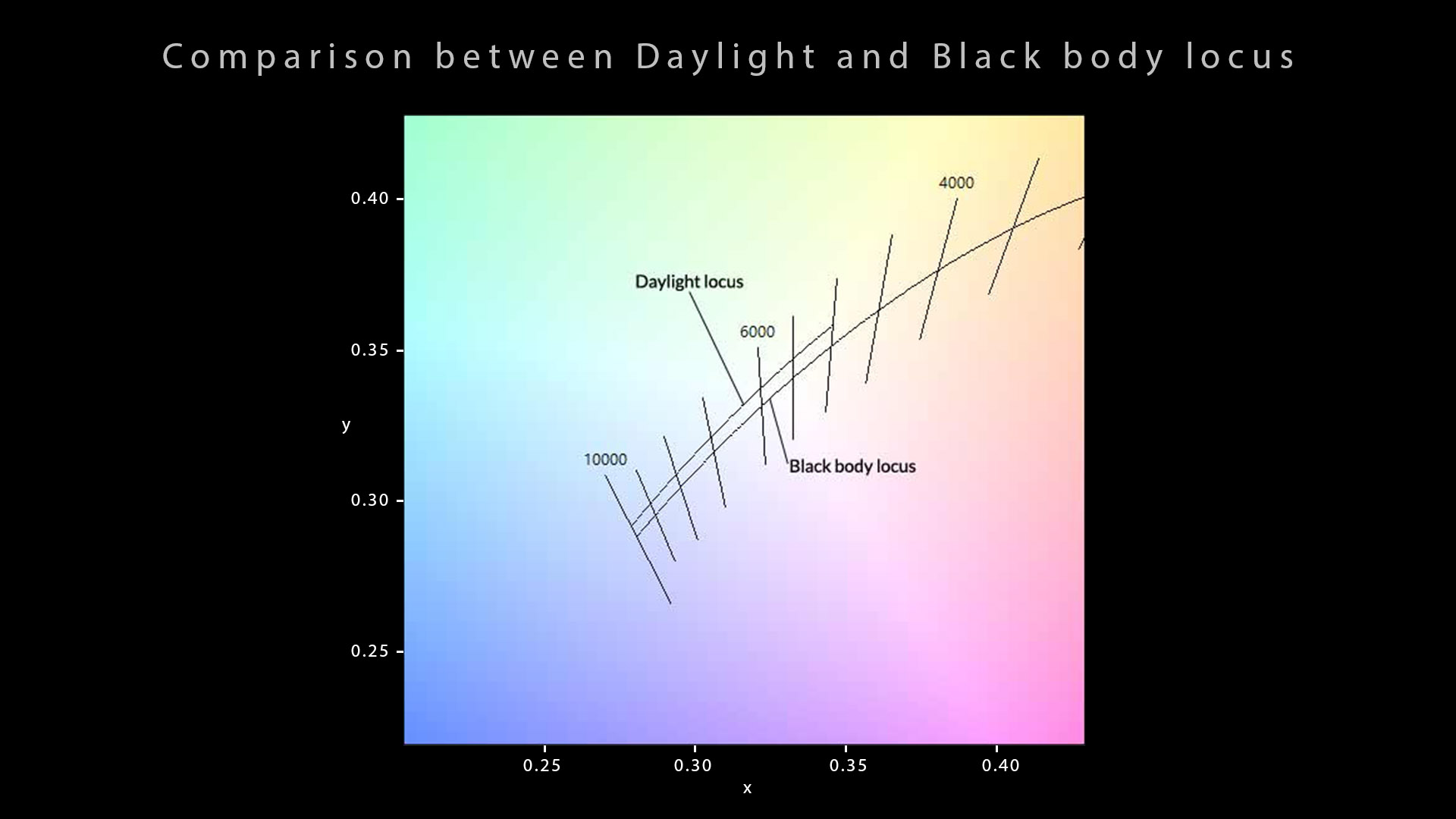
Here is a little summary about those two notions (from Wikipedia):
- Black body locus or Planckian locus is the path that the color of an incandescent black body would take in a particular chromaticity space as the blackbody temperature changes.
- Daylight locus is defined with a mathematical function (see CIE D series illuminants). For displays, we tend to match the daylight locus and most color spaces have daylight white points (such as D65).
Kelvin comparison
Is there a better way between working in RGB or Kelvin ? I know that this question is quite controversial. Some studios almost had a holy war about it. In my opinion, it is only a matter of art direction and habits.
“The secret life of pets” (Director: Chris Renaud, Art Direction: Colin Stimpson) has been almost entirely lit with Kelvin temperatures to get a natural look. This would have been completely impossible on “Lego Batman” (Director: Chris McKay, Production Designer: Grant Freckelton) because of its saturated and very original art direction.
Some supervisors prefer to work with Kelvin to avoid unnatural colors. It is like a safety net to them. I personally prefer RGB.
But, honestly I don’t blame them.
There is one BIG difference though between these two films: how compositing was used.
- “The secret life of pets” mostly got his filmic look in compositing thanks to gamma, color corrector and saturation nodes.
- “Lego Batman” got his saturated look directly in lighting. I used the most extreme RGB values in my lights at Animal. It was almost a cultural shock to me.
I know some people may disagree so let me explain better. I am not saying there was no compositing involved on Lego Batman. But since we rendered with 3D motion-blur and depth-of-field, it was the first time in my life that I could get the final result in my render view.
More on that in Chapter 9.


This is actually a huge debate in studios. How close a render should be to the final image ? I personally think that we should be as close as we can to the final render.
Color Schemes and Harmonies
Interestingly enough, the RYB Color Wheel is quite often used for Color Scheme study. It is probably due to the historic use of red, yellow, and blue pigments as primary colors in art and design, particularly painting. Here is a representation of Color Schemes:

- Monochromatic colors are all the colors of a single hue.
- Analogous colors are groups of three colors that are next to each other on the color wheel.
- Complementary colors are pairs of colors which, when combined or mixed, cancel each other out by producing a gray scale color like white or black. When placed next to each other, they create the strongest contrast for those two colors and are always opposite on the color wheel.
- Split-complementary color scheme is a variation of the complementary color scheme. In addition to the base color, it uses the two colors adjacent to its complement. This color scheme has the same strong visual contrast as the complementary color scheme, but has less tension.
- Triadic Colors that are evenly spaced around the color wheel. Triadic color harmonies tend to be quite vibrant, even if you use pale or unsaturated versions of your hues.
- Tetradic or Rectangle is a combination of four colors that consist of two sets of complementary colors. These colors form a rectangle on the color wheel. The colors on the short side of the rectangle are spaced one color apart.
- Square is a combination of four colors equally spaced around the color wheel.
You can find more explanation about color schemes here and from these slides.
Schemes examples
They are really fun to play with. It is interesting to have a look at the full list of color schemes because animated feature films mostly use the complimentary scheme.
Here is a quick study of the color schemes from “Toy Story 4” (Director: Josh Cooley, DP: Jean-Claude Kalache and Patrick Lin). There is a great variety in this movie.


Some Color Scheme Generators are available here and here (even Adobe has made one).
After a few years working on animated feature films for Hollywood, you kind of end up seeing only two colors: Orange and Blue. Like this movie, “Coco” (Director: Lee Unkrich, DP: Matt Aspbury and Danielle Feinberg):


What I really like though is that they change the scheme when introducing this new character Ernesto de la Cruz. The choice of green color is not fortuitous, it makes you feel uncomfortable. Maybe you don’t realize it when watching but your brain is probably like “something is off with this guy.” We will come back to the green color a bit below.
Since we are talking about standardization on a movie, I am going to make a public confession. I have used the same blue color for the past ten years in all of my sky-related lights such as top, rim or environment lights: R: 0.4 / G: 0.7 / B: 1. Same goes for the sun: R: 1 / G: 0.8 / B: 0.6. Yes, I only use round values, they are easier to share and to remember.
Those values are in “linear_rec709″.
Color Psychology
The use of colors is certainly not something to take slightly. Each color can have a strong impact on us based on our age, culture or gender. In 1980, Robert Plutchik constructed a diagram of emotions visualizing eight basic emotions: joy, trust, fear, surprise, sadness, disgust, anger and anticipation.

The sequence from “Coco” with Ernesto de la Cruz uses pink and green which gives “annoyance” and “apprehension“. Pretty accurate right ? Interestingly enough, Pixar has inverted the colors of “Fear” and “Disgust” for the movie “Inside Out”.
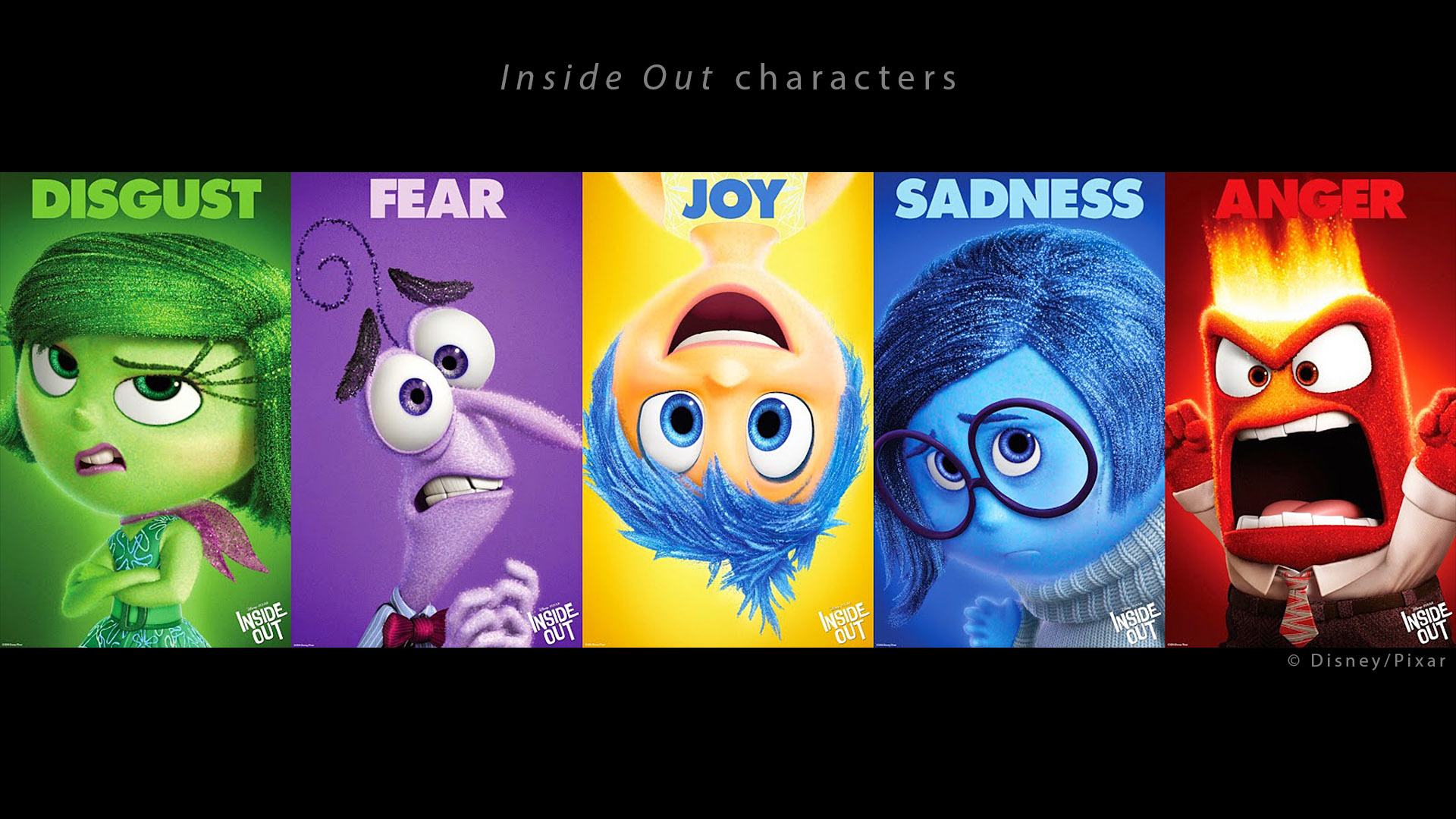
Here is an explanation on the Character Design:
We relied on some verbal idioms like I feel blue, I feel sad, I’m about to explode with rage, etc.[…] Joy was a star, or a spark. Golden and illuminated. Sadness was a teardrop. So her shape and color resemble a teardrop. Fear is like a raw nerve, just a squiggly line, that’s why he’s tight. Disgust is the shape and color of a stalk of broccoli. And of course anger is a brick, immovable.
This makes sense but I am still not sure why “Fear” is purple though.
Color and Emotions
According to Paul Ekman, emotions are universal. But the way we show them, like our attitude, is cultural. He also says that what triggers the emotion is a personal factor.
But we should be careful to interpret colors as symbols because they are mostly linked to a culture historically and geographically. Let me just quote Sharon Callahan here because I do not want you to think there is a universal color code (it is a bit more complicated than that):
Not until the Renaissance was color appreciated as an aesthetic choice. […] There are enough common life experiences and contexts within which to draw some generalizations about how color affects us emotionally, especially in American culture where many of them have been stereotypically reinforced by advertising.
Color temperature for natural and artificial lighting are quite universal. To deviate from them will most likely provoke a reaction. But nothing says that this reaction will be the same for every culture of viewers.
Perfect example for that is the white color: white being connected to weddings in the Western world but to funerals in China.
Production Examples
I am going to detail here different feature films. Each movie production can be quite unique due to various factors: art direction, size of the company, roles among the team… But let’s not kid ourselves. Most movies are a huge investment and most producers want to play it safe: I have lit the same way and used the same colors on “Planet 51“, “The secret life of pets“, “Ninjago” or “The Star“.
Planet 51 and The secret life of pets
Much like “Planet 51“, “The secret life of pets” has a natural look. It does not mean we only used natural lights but that the look of the film is natural, as opposed to artificial. We will dive deep in this topic in Chapter 4.


Natural looks are very common in animated movies.
Playmobil
I had the chance to work directly with Rémi Salmon, Production Designer of Playmobil the movie. Having him on the floor with the lighting crew was really useful: he was often available if I had any doubts or questions. Here is a couple of examples where Rémi used color to reinforce the story.
There is a sequence where two characters disagree and are arguing. How can you use color to translate this visually ? I thought Rémi’s solution was really cool:
We are going to use the garland behind them as a justification for playing some colorful rims. However, Marla’s head will be lit in blue and Del’s in pink. And we will use a gradient to invert those colors on the seats. It is like if each character was in his own bubble.
I really thought this was a great idea. Here are screen grabs from YouTube (and a link to my demo if you want to check the shots):


Apparently, a similar technique has been used on the movie… “Se7en” (Director: David Fincher, DP: Darius Khondji) ! Check this article, it is a must-read !
The mismatched investigators examine a cache of revealing notebooks discovered in John Doe’s apartment — conflicting color temperatures adding to the scene’s unease.
Playmobil night sequence
We did another sequence with the same two characters where they land in an hostile city at night. Same challenge here: How do you make the viewer feel their discomfort ? Another great solution by Rémi:
We are not going to make the sky blue. But green. This will show their discomfort. Green is a pretty uncomfortable color.
There was a debate about whether the sky should be blue or green. The blue version was nice but I thought green was more original and served better the story. I am really glad we could stick to this idea. Let’s say that the blue version was the safe one since 90% of CG movies have a blue night. Here is part of the sequence:
Physical but green
I had a conversation recently on how to make the sky green in CG. Let’s say you are on a technically oriented show and for some practical reasons you want to stick a physical skylight. You have two possible solutions:
- The green tint of the sky comes from a grade in compositing. This could be done in Nuke or even Digital Intermediate (DI).
- The green comes from the haze (volumetric effect) by tweaking its color and/or the environment light.
I personally like when the sky I see in my render view is the one that illuminates the scene. So I would prefer the second option. But there are many variables at play to choose between these two solutions (look, budget, time constrain…).


It is fun to play with artificial skylights once in a while.
The green problem
This theory about green was confirmed to me in this book by James Gurney. I read this book when I was working on the sequence above. and I started to connect the dots… Have a look at James’ blog, there is some amazing stuff there.
The Green Problem: In the paperback book field, there’s an old saying that “green covers don’t sell.” Costume designers have told me that green often looks ghastly in stage lighting. Gallery directors have reported that clients aren’t attracted to paintings with a strong greenish cast, especially if the color tends toward a bright yellow-green.
Why did I use Playmobil as my first two examples ? Because On Animation was a pretty small company (around 200 people) and we had the chance to have Rémi on the floor with us and during dailies. That is something we do not see that often unfortunately.
Lego Batman
One more example about the green color. In Lego Batman, there is a sequence where the Joker tricks Batman and offers him a deal. Guess what is the dominant color of the sequence ?


Having Color Schemes per character is a very powerful tool. It can show their personality and their arc through the story. The Batcave in the slide above is the perfect example of having the same location under different influences: the change of color scheme indicates an important story point.
Lego Batman night sequence
Here is an other example on Lego Batman: we were launching a sequence set in the woods at night, and Grant Freckelton was showing me some references. He told me:
We are going to make a sequence where the key will be warm on the set, neutral on the characters and blue on the volumetric FX.
When I heard this, I can tell you that my heart skipped a beat. What the heck ? How can one make this work ? Different colors for the same key ? I just had finished “The Secret Life of Pets” where we did not use any Light-Linking and barely no “cheat”… I was not prepared for this !
Use of color in “Lego Batman” was very original and pretty much pushed to the maximum. It is the only movie where I used these (almost) pure colors: R: 1 / G: 0.01 / B: 0.01. It took me some time to accept it, since it was so different to what I was used to.


After a few reviews with Grant, I realized his vision was just great. The colors worked really well together. It is actually a pretty common technique in Grant’s work: different colors for geometry and volumetric give depth and readability.
Something important to notice is that we used neutral lights on the characters for the skin tones. A blue light on a Lego figure (or a minion) does not look good ! Damn green !
How to train your dragon
I haven’t worked on this movie but I would like to use this example from Dave Walvoord. Do not hesitate to check his talk from Siggraph 2019. It is a very interesting read ! I think the color principle he is describing below is simple but very clear and efficient.


Very interesting how the color is linked to the story.
“Using this color theory as a guide for lighting, it means that the Hidden world is lit with mostly neutral lights to allow the local colors to dominate. While in the human world, due to the desaturated local color palette, very saturated lights can be used to give each sequence a distinctive color palette and to enhance its mood.”
Interesting comment about color in Lighting Design for Stylized Animation.
Color and lights
It is difficult to come with some advice on color but here is my two cents. When you light, try not to have overlapping colors since they will just cancel each other.
For example if you light a character, try to have one main hue for the left lights and an other hue for the right ones. Otherwise your render will just blend these colors (additive process) and get all muddy.


Let’s now have a look at a clear example from “How to train your dragon” where lights do not cancel each other and their temperature blend perfectly.


Another great example of natural look, enhanced by dramatic lights.
I am bit overlapping with Chapter 8 about Shot Lighting. The idea is to show that different directions of lights call generally for different colors. The choice of colors and intensity in your lights is one of your most important task. Fortunately, we generally have a reference to guide us.
I generally avoid to putting a value of “0″ in CG. This quite a dangerous value as it completely removes the channel information (like an aggressive optimization). And if you want to tweak your lights later in Nuke, you won’t have any room to do so. Here is an example using a scan by Lee Perry Smith:


Concept and Color Keys
It may seem trivial but this is one of the key point of my book. Should we apply the same colors and values between a 2D and a 3D image ? What difference is there between the two mediums ? Do we have to match perfectly a color key in CG ?
I completely agree with Dave Walvoord on this topic:
“First, we use color keys as a guide, not a destination. […] We try not to take our color keys too literally. We want to be open to happy accidents and the process of discovery as we move into 3D.”


Even if we share some visual principles with 2D and live-action, PBR CG has its own rules. The color key above looks great in 2D, but I guess in 3D there was a lack of details in the grass, shadows were harsh on the faces and they needed more patterns to make the render pleasant.
Color and medium
In my experience matching a 2D color key actually depends on many factors: the relation between the art department and lighting, the director of the movie, the schedule… Some supervisors like to stick to references, some don’t care… It really depends.


I’ll now use a the short film “Competition” as an example where the color and the medium were deeply connected. I’ll focus on the first minute. Let’s have a look:
https://youtu.be/PjfP2tmjtQM?t=27
Adapting the color keys to CG was a bit of headache in this short film. The CG artists tried to match as close as they could but something did not quite fit. I personally think it was mainly due to the change of medium. Here is my explanation:


An important aspect of CG is that we need details. And guess what ? Details are expensive. Once again if you are a surfacing artist, do not hesitate to check the PBR guide from Substance. It is a great read on how to add colors and details to a material.
I’ll finish with this quote from a great CG supervisor: each step of the pipeline should be an improvement from the previous step. Layout should be an improvement from storyboard and the same applies for lighting and color keys.
The 2D legacy
What happened on most movies I have worked on ? The director used to be an animation supervisor and the art director is an illustrator with a 2D background. This may cause some issues when reviewing CG lighting shots.
I have sometimes heard comments during reviews such as “Can you remove the Global Illumination ?” or “Can you make the shadows brighter without changing the rest ?“.
There is very often a cultural shock between 2D and 3D and the best solution I know is this one: have an Art Director who is PBR friendly. Let’s have a look at these photos by Sabine Weiss and concepts by Alberto Mielgo.


Let me be crystal clear here. I am not saying that 2D is lacking details if you compare to 3D. I am saying that 2D can afford some minimalism (a simple ramp or a brush stroke) that 3D (PBR cartoon) cannot. You may see this in Lou Romano’s work for example. But it does not make one medium better than the other.
On a feature movie produced in Canada, the art director would keep asking for gradients everywhere. Can I have a gradient from the head to the feet ? And one from the foreground to the background ? And one from the left side of the character to the right ?
I let you imagine how the light rigs would look after this kind of comments.
Lego Batman experience
It seems to me there was an interesting solution on Lego Batman for the division of roles:
- Chris McKay is the director of “Lego Batman“, taking care of many tasks such as layout, animation, dialogues, editing and storytelling.
- Grant Freckelton is the Production Designer of “Lego Batman” taking care of modeling, surfacing, lighting, visual effects and DI.
I personally think this division of labors was really efficient. Each of them was responsible for what he knew best.
What does this mean concretely ? Chris McKay was not present during lighting dailies. Grant and Craig Welsh were running the show in lighting. And once a week, they would show the approved shots to Chris. The worst retake I ever had from him was: “There is an important line of dialogue by the end of the shot. Can you make Barbara’s face a bit brighter ?” This shows a very smooth work relationship.
Grant, our production designer, who would work mainly in Photoshop, actually knew about Global Illumination and our render engine: Glimpse. That’s very rare. I asked him if he was trained:
Just enough to understand the various passes that come out of rendering and the basic principles of shading and lighting. […] Physically based renderers like Glimpse and Vray are much easier to get good results from than many legacy rendering techniques… which means they’re easier for non-technically mind artists to grasp.
You can check Max Liani’s blog here.
So it looks like that PBR not only benefits CG artists but also Art Directors. Win-win !
Artist or Technician ?
Nowadays, thanks to path tracing and modern workflows, these two sides (“art” and technology”) are collaborating more successfully. But it is still an issue in many studios. On one side, we have artists who talk about color, composition, shapes and design. On the other side, we have CG supervisors who talk about specular, roughness, light-linking and displacement bound. We need these two worlds to communicate and share because they both have to learn from each other.
I once asked a colleague in London: are we artists or technicians ? I still remember his answer: “a little bit of both”.
The word “artisan” is a good job description.
The BIG issue we are facing today is about Color Keys. How do we translate a 2D image painted in Photoshop into a PBR 3D medium ? It may sound basic but believe me, it is a very common issue. How do we succeed in making these two worlds work hand-in-hand ?
A word from Grant
I also asked Grant about his views on color: “Do you have any process to choose the color schemes ? Is it based on the script, your “guts” or just references you like ?” His answer is pretty interesting:
I wish I had a process ! This is a complicated one because it changes depending on each director. It is a mixture of doing a color script in some situations and guts in the other. It’s also a matter of trying to balance aesthetics (making it look cool) with storytelling (making choices that support the process of conveying information and provoking and emotional response). Some directors are happy with a steady onslaught of ‘cool’…. others are all about clarity or naturalism or whatever. This could be a whole discussion about colour theory… but as someone who never learnt colour theory formally I can say guts can account for a lot of it too. I’m still learning about how to use colour !
I love his honesty. “Still learning”. That’s just awesome !
The mental image
It seems that one of the main differences between the 2D guys and the 3D guys is about exposure. This is at the core of all our issues in feature animation. And more interestingly this issue can actually be summed up in one image. Pretty cool, right ?

I asked a great 2D art director and an amazing lighting supervisor the following question: “What should we try to reproduce in CG ? The camera or the eye ?” They both gave me a different answer:
- The art director replied: the eye.
- The lighting supervisor replied: the camera.
Generally a director with a 2D background will aim at our mental image (right image), when a supervisor with a live-action experience will go for the camera exposure (left and center images). The only solution I know is to reach an agreement and make a clear choice.

I guess having Roger Deakins as a visual consultant helped in that process.
From Dave Walvoord: Traditionally, animated films are made as viewed from the eye of a painter because of the 2D origins of animation. The Dragon franchise uses the view from the camera.
They did a bold choice on Dragon.
Most of the movies I have worked on had a “mental image” photography. I personally call this style “filled-saturated” (“débouché-saturé” in french), so it does not scare the children. The shot below from “The secret life of pets” (Director: Chris Renaud, Art Director: Colin Stimpson) is a perfect example.

With a photographic exposure, the sky would be blown-out.
Conclusion
I have tried to express my view on color as a lighting artist. I hope you find it useful !